assignin
Assign value to variable in specified workspace
Syntax
assignin(ws, 'var',
val)
Description
assignin(ws, ' assigns the value var',
val)val to the variable var in
the workspace ws. The var input
must be the array name only; it cannot contain array indices. If var does
not exist in the specified workspace, assignin creates
it. ws can have a value of 'base' or 'caller' to
denote the MATLAB® base workspace or the workspace of the caller
function.
The assignin function is particularly useful
for these tasks:
Exporting data from a function to the MATLAB workspace
Within a function, changing the value of a variable that is defined in the workspace of the caller function (such as a variable in the function argument list)
Examples
Example 1
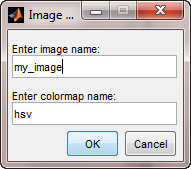
This example creates a dialog box for
the image display function, prompting a user for an image name and
a colormap name. The assignin function is used
to export the user-entered values to the MATLAB workspace variables imfile and cmap.
prompt = {'Enter image name:', 'Enter colormap name:'};
title = 'Image display - assignin example';
lines = 1;
def = {'my_image', 'hsv'};
answer = inputdlg(prompt, title, lines, def);
assignin('base', 'imfile', answer{1});
assignin('base', 'cmap', answer{2});
Example 2
assignin does not assign to specific elements
of an array. The following statement generates an error:
X = 1:8;
assignin('base', 'X(3:5)', -1);
However, you can use the evalin function
to do this:
evalin('base','X(3:5) = -1')
X =
     1     2    -1    -1    -1     6     7     8